


MENUS · SERVICES · PRODUCT CATALOGS
Your menu and catalog. Your own style.
Present your menu, services and products in your own style. One scan for your customers. One place to manage it all.
- Opens with a QR code
- Made for mobile
- Managed in one place
Your customer scans a QR code. Your catalog opens in their browser.


Every stand opens its venue’s own menu.
Built around your business
FOR EVERYDAY WORK
From catalog to orders, in one panel.
Choose your business sector separately, then present a menu, services or a product catalog.
Start with an existing file
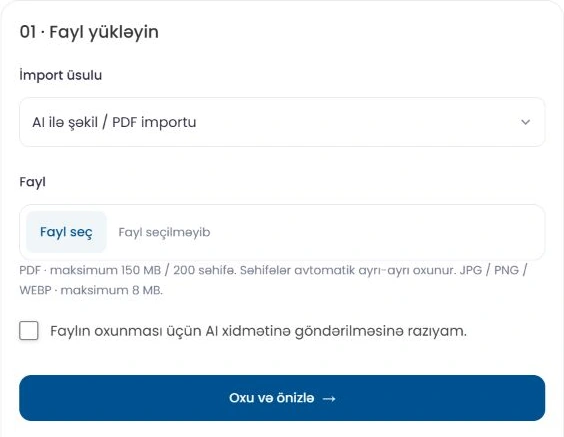
Read an image or PDF with Menu Ai, or upload Excel. Review categories, prices, extras and variants before saving.
Prepare with Menu Ai
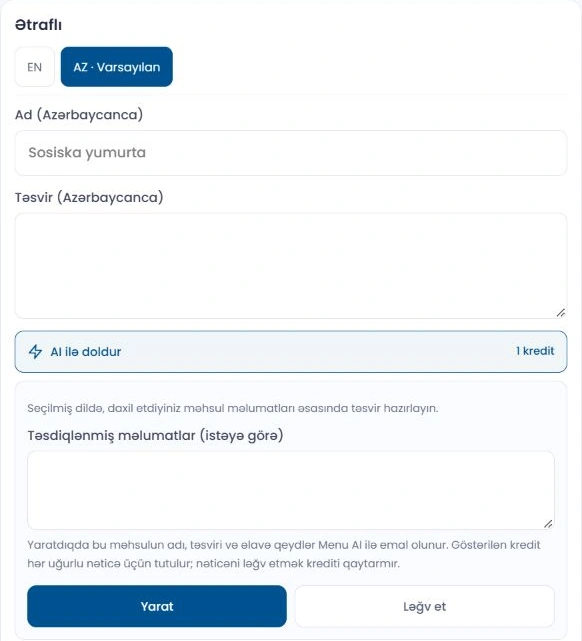
Create product descriptions and images. Use a selected image style for a consistent presentation and apply results after review.
Manage prices and choices
Organise sizes, variants, extras and discounts. Select which fields to change when updating an existing catalog.
Make it your own
Choose a theme, colours, fonts, logo and cover. Check changes in the phone preview.
Languages and contact details
Set catalog languages, hours, phone numbers, social profiles and a Google Maps link for your business.
Follow your orders
Manage the order types you enable. Follow incoming orders, update their status and open receipts.
Features depend on your plan and enabled account settings. Menu Ai operations use credits. Compare plans
EASY TO START
Ready to share in three steps.
Create your business
Set your sector, presentation type and essential details.
Prepare your catalog
Add items manually, import a file or use Menu Ai.
Review and share
Check the layout on your phone, then share your link and QR code.
Go beyond a product photo.
Build a richer presentation with galleries, video and ready-made 3D/AR files. AR requires a compatible phone and model file.
Give your QR link a physical home.
Explore QR stands and place a link to your catalog on a table or service counter.
Explore QR stands3 il ərzində "menu-in.com" xidmətindən istifadə edirik və servisdən çox razıyıq.

Restoranımız üçün "menu-in.com" servisindən istifadə edərək QR menyu sistemi qurduğ və idarəetmə panelinin köməyi ilə menyu siyahımızı asanlıqla dəyişdirə bildik!

Restoranımızda müştərilər üçün rahatlıq yaratmaq məqsədilə menu-in.com QR menyu xidmətindən istifadə edirik.

Subscription plans
Choose the plan that fits your business.
Blog
Put your tools to work.
Practical guides to importing, product presentation and catalog management.
A consistent product style with Menu AI: preparing descriptions and images
In a good product presentation, the image and description should tell the same story. Menu AI helps you prepare text and image drafts. The final...
Read articlePreparing a catalog with Excel: prices, variants and images
Excel is a convenient way to prepare a catalog in bulk and compare existing information. In Menu-in, you can start with a simple template or expo...
Read articleFrom images and PDFs to a catalog: importing with Menu AI step by step
If you already have a menu image or a PDF price list, you may not need to type every product again. Menu AI reads the file and prepares a catalog...
Read articleIs Menu-in only for restaurants?
No. It supports restaurants and cafés, hotels, salons, shops, tyre centres, dry cleaners, medical suppliers and other businesses. Choose your business sector separately from the presentation format: menu, services or product catalog.
Can I build a catalog from a PDF or image?
Yes. Use Menu AI in Import and export to read an image or PDF, then review the preview. Check categories, names, prices, extras and variants before saving. AI results need an accuracy check.
Can Excel include images, extras and variants?
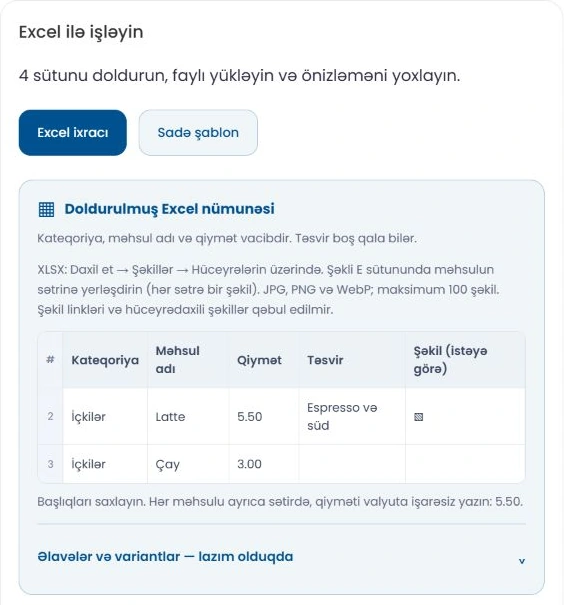
Yes. The simple template includes core product fields and separate optional sheets for extras and variants. In XLSX, place one JPG, PNG or WebP over the cell in the Image column for each product row. Image URLs, IMAGE formulas and special in-cell images are not supported. Upload limits are shown in the panel.
Will a price update change my images or descriptions?
Price-only mode updates prices while preserving existing images and descriptions. For a broader update, choose the fields to change in the preview. Excel images can keep the existing image, replace it or be skipped.
How are Menu AI credits calculated?
Image/PDF import uses one credit per image or PDF page. Description and image generation costs appear on the action button. Credits can be granted by an admin, included in eligible plans or offered in available packages. Purchases depend on enabled payment methods. Excel import does not use AI credits.
Can I preview the design before saving?
The business create/edit form provides a phone preview for theme and appearance changes. After saving, also check the published catalog on a phone. Use logo, cover, colour and font settings to match your brand.
MENU-IN
A catalog as considered as your business.
Add your business, start with your first product and check the result yourself.