








Menu-in · الأسئلة الشائعة
الأسئلة الشائعة
إجابات عن Menu Ai واستيراد الملفات والأرصدة وإدارة الكتالوج.
هل Menu-in مخصص للمطاعم فقط؟
لا. يدعم المطاعم والمقاهي والفنادق والصالونات والمتاجر ومراكز الإطارات والمغاسل والتنظيف الجاف ومورّدي المستلزمات الطبية وغيرها من الأعمال. اختر قطاع أعمالك بشكل مستقل عن تنسيق العرض: قائمة طعام أو خدمات أو كتالوج منتجات.
هل يمكنني إنشاء كتالوج من ملف PDF أو صورة؟
نعم. استخدم Menu AI في قسم الاستيراد والتصدير لقراءة صورة أو ملف PDF، ثم راجع المعاينة. تحقق من الفئات والأسماء والأسعار والإضافات والخيارات قبل الحفظ. تحتاج نتائج الذكاء الاصطناعي إلى التحقق من دقتها.
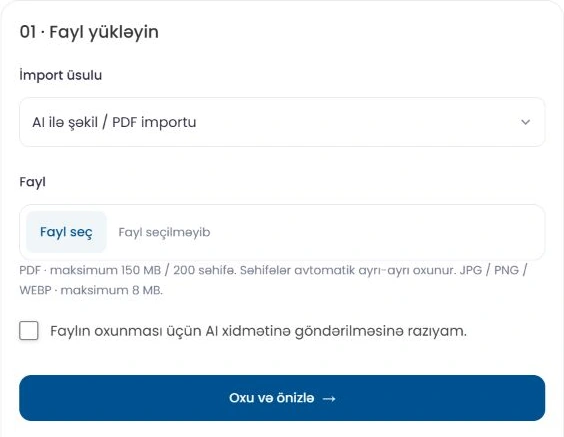
هل يمكن أن يتضمن Excel صورًا وإضافات وخيارات؟
نعم. يتضمن القالب البسيط حقول المنتجات الأساسية وأوراقًا اختيارية منفصلة للإضافات والخيارات. في ملف XLSX، ضع صورة JPG أو PNG أو WebP واحدة فوق خلية عمود الصورة لكل صف منتج. لا تُدعم روابط الصور وصيغ IMAGE والصور الخاصة داخل الخلايا. تظهر حدود الرفع في اللوحة.
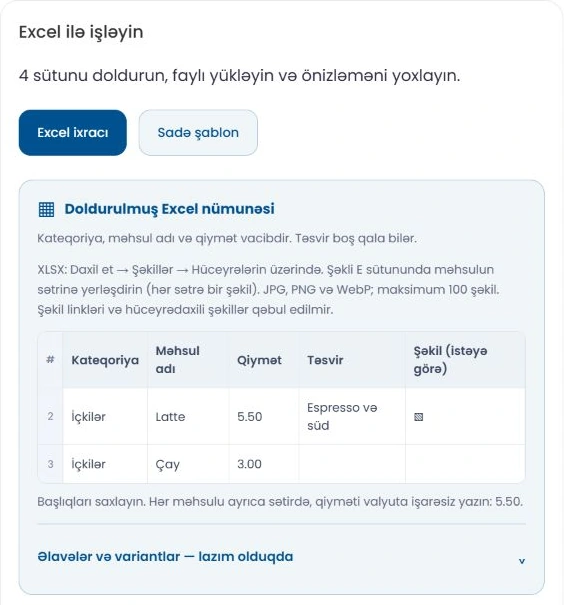
هل سيغيّر تحديث الأسعار صوري أو أوصافي؟
يحدّث وضع الأسعار فقط الأسعار مع الحفاظ على الصور والأوصاف الحالية. لتحديث أشمل، اختر الحقول التي تريد تغييرها في المعاينة. بالنسبة إلى صور Excel، يمكنك الاحتفاظ بالصورة الحالية أو استبدالها أو تخطيها.
كيف تُحسب أرصدة Menu AI؟
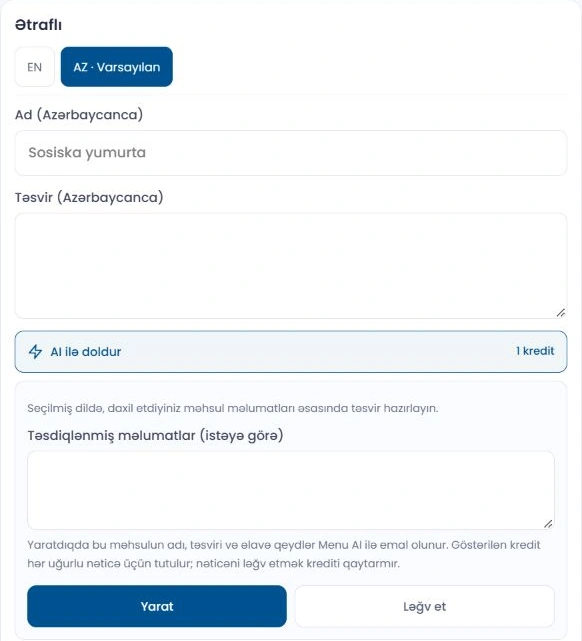
يستخدم استيراد الصور وPDF رصيدًا واحدًا لكل صورة أو صفحة PDF. تظهر تكلفة إنشاء الأوصاف والصور على زر العملية. يمكن أن يمنح المسؤول الأرصدة أو أن تكون مشمولة في الباقات المؤهلة أو متاحة ضمن حزم معروضة. تعتمد إمكانية الشراء على طرق الدفع المفعّلة. لا يستخدم استيراد Excel أرصدة الذكاء الاصطناعي.
هل يمكنني معاينة التصميم قبل الحفظ؟
يوفر نموذج إنشاء الأعمال وتعديلها معاينة للهاتف لتغييرات القالب والمظهر. بعد الحفظ، تحقق أيضًا من الكتالوج المنشور على هاتف. استخدم إعدادات الشعار والغلاف والألوان والخطوط لتناسب علامتك التجارية.
هل يمكن لـMenu AI كتابة الأوصاف وإنشاء الصور؟
نعم، يمكن للأدوات المفعّلة في الاستوديو ومحرر المنتج إعداد مسودات للنصوص والصور. راجع النتيجة واخترها، ثم احفظ المنتج. تأكد من المكونات وغيرها من معلومات المنتج قبل النشر.
هل يمكن أن تتبع صور المنتجات أسلوبًا واحدًا؟
اختر نمط صور متاحًا لأعمالك. يمكن للمسؤول تحليل صورة إلى ثلاث صور مرجعية ومراجعة القواعد المقترحة وحفظ النمط. يساعد ذلك في توحيد الخلفيات والإضاءة والتكوين؛ وتظل كل نتيجة بحاجة إلى مراجعة.
هل يحتاج عميلي إلى تثبيت تطبيق؟
لا. يفتح الرابط أو رمز QR الكتالوج في متصفح هاتف العميل. لا حاجة إلى تثبيت تطبيق منفصل.
هل يمكن أن يكون للمنتج أحجام وأسعار متعددة؟
نعم. استخدم خيارات المنتج للأحجام والسعات والاختيارات الأخرى، والإضافات للمنتجات أو الخدمات الإضافية. أثناء الاستيراد، تحقق من أن كل سعر يطابق حجمه وأن مجموعات الخيارات متناسقة.
كيف تعمل الطلبات والفيديو والواقع المعزز؟
تُدار أنواع الطلبات المفعّلة في اللوحة. يمكنك رفع فيديوهات المنتجات ورسوم المكونات المتحركة الجاهزة. يتطلب الواقع المعزز ملف نموذج ثلاثي الأبعاد متوافقًا وجهازًا مدعومًا. إنشاء الفيديو بالذكاء الاصطناعي غير مفعّل حاليًا؛ جهّز ملفات الفيديو والنماذج ثلاثية الأبعاد وارفعها بشكل منفصل.
هل يمكنني تقديم الكتالوج بلغات متعددة؟
نعم. اختر لغات الكتالوج واللغة الافتراضية في إعدادات الأعمال، ثم أكمل ترجمات الفئات والمنتجات. لا تؤدي إضافة لغة إلى ترجمة جميع الحقول تلقائيًا؛ تحقق من كل لغة.

هل يمكنني إضافة ساعات العمل وخرائط Google؟
نعم. أضف ساعات العمل والعنوان والهاتف وحسابات التواصل الاجتماعي. تدعم خرائط Google روابط المشاركة العادية وروابط maps.app.goo.gl القصيرة ومعلومات التضمين المتوافقة. تحقق من الخريطة في الكتالوج بعد الحفظ.
هل يمكن للمسؤول عرض سجل الاستيراد واستعادة عملية استيراد؟
تظهر عمليات الاستيراد المحفوظة الجديدة في سجل تغييرات المسؤول. يمكن استعادة آخر عملية استيراد مؤهلة بعد التحقق من التعديلات اللاحقة والطلبات المرتبطة. تُمنع الاستعادة عندما لا تضمن هذه الفحوص حماية البيانات الحالية.
هل يجب إعادة طباعة رمز QR عند تغيير الكتالوج؟
إذا بقي رابط الكتالوج كما هو، فلا تتطلب تغييرات المنتجات والأسعار رمز QR جديدًا. تحقق من الرموز الحالية إذا غيّرت الرابط. استكشف خيارات العرض الملموسة في صفحة حوامل QR.
كيف أبدأ وأختار باقة؟
يفتح زر البدء صفحة تسجيل الدخول، حيث يمكنك إنشاء حساب إذا لم يكن لديك حساب. أضف أعمالك وجهّز الكتالوج. قارن الحدود والميزات المشمولة في صفحة الأسعار؛ وتُعرض أرصدة الذكاء الاصطناعي بشكل منفصل.