






Menu-in · अक्सर पूछे जाने वाले प्रश्न
अक्सर पूछे जाने वाले प्रश्न
Menu Ai, फ़ाइल आयात, क्रेडिट और कैटलॉग प्रबंधन से जुड़े जवाब।
क्या Menu-in सिर्फ़ रेस्तराँ के लिए है?
नहीं। यह रेस्तराँ और कैफ़े, होटल, सैलून, दुकानें, टायर केंद्र, ड्राई क्लीनर, चिकित्सा सामग्री के आपूर्तिकर्ताओं और अन्य व्यवसायों के लिए है। व्यवसाय का क्षेत्र प्रस्तुति के प्रारूप से अलग चुनें: मेन्यू, सेवाएँ या उत्पाद कैटलॉग।
क्या मैं PDF या चित्र से कैटलॉग बना सकता हूँ?
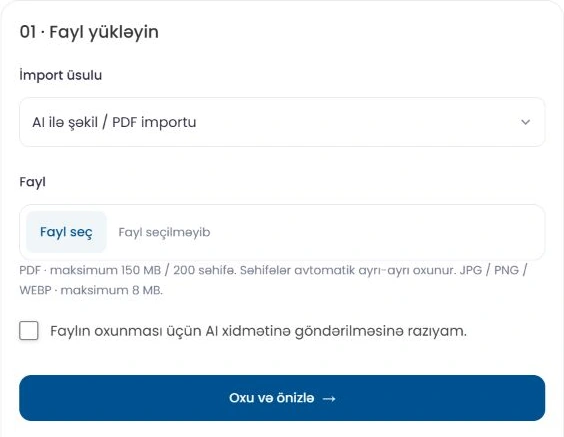
हाँ। आयात और निर्यात में Menu AI से चित्र या PDF पढ़ें, फिर पूर्वावलोकन जाँचें। सहेजने से पहले श्रेणियाँ, नाम, कीमतें, अतिरिक्त विकल्प और वैरिएंट जाँचें। AI के परिणामों की सटीकता जाँचना ज़रूरी है।
क्या Excel में चित्र, अतिरिक्त विकल्प और वैरिएंट शामिल हो सकते हैं?
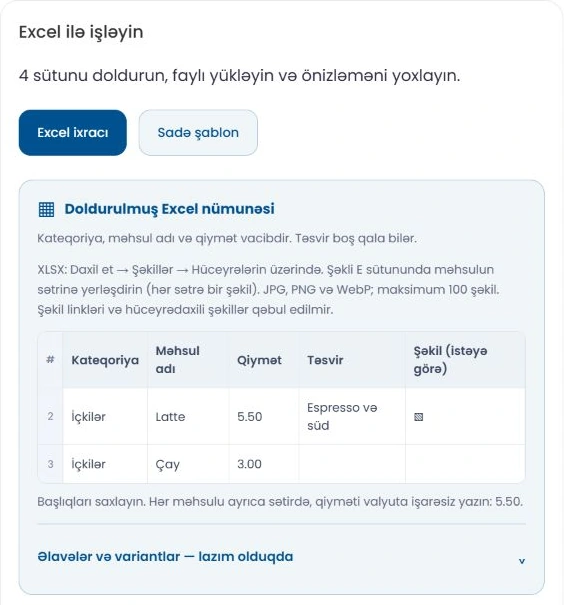
हाँ। सरल टेम्पलेट में उत्पाद के मुख्य फ़ील्ड और अतिरिक्त विकल्पों तथा वैरिएंट के लिए अलग वैकल्पिक शीट होती हैं। XLSX में हर उत्पाद की पंक्ति में चित्र वाले कॉलम की सेल के ऊपर एक JPG, PNG या WebP रखें। चित्र के URL, IMAGE फ़ॉर्मूले और सेल के अंदर विशेष चित्र समर्थित नहीं हैं। अपलोड की सीमाएँ पैनल में दिखाई जाती हैं।
क्या कीमत अपडेट करने से मेरे चित्र या विवरण बदल जाएँगे?
केवल कीमत वाला मोड मौजूदा चित्र और विवरण बनाए रखते हुए कीमतें अपडेट करता है। ज़्यादा बदलाव के लिए पूर्वावलोकन में बदलने वाले फ़ील्ड चुनें। Excel के चित्रों के लिए मौजूदा चित्र रखा, बदला या छोड़ा जा सकता है।
Menu AI के क्रेडिट कैसे गिने जाते हैं?
चित्र/PDF आयात में हर चित्र या PDF पेज पर एक क्रेडिट लगता है। विवरण और चित्र बनाने की लागत कार्रवाई वाले बटन पर दिखती है। क्रेडिट एडमिन दे सकता है, योग्य योजनाओं में शामिल हो सकते हैं या उपलब्ध पैकेज में मिल सकते हैं। खरीद सक्रिय भुगतान तरीकों पर निर्भर करती है। Excel आयात में AI क्रेडिट खर्च नहीं होते।
क्या मैं सहेजने से पहले डिज़ाइन का पूर्वावलोकन देख सकता हूँ?
व्यवसाय बनाने और संपादित करने वाले फ़ॉर्म में थीम और रूप के बदलावों के लिए फ़ोन का पूर्वावलोकन मिलता है। सहेजने के बाद प्रकाशित कैटलॉग भी फ़ोन पर जाँचें। अपने ब्रांड के अनुसार लोगो, कवर, रंग और फ़ॉन्ट की सेटिंग इस्तेमाल करें।
क्या Menu AI विवरण लिख सकता है और चित्र बना सकता है?
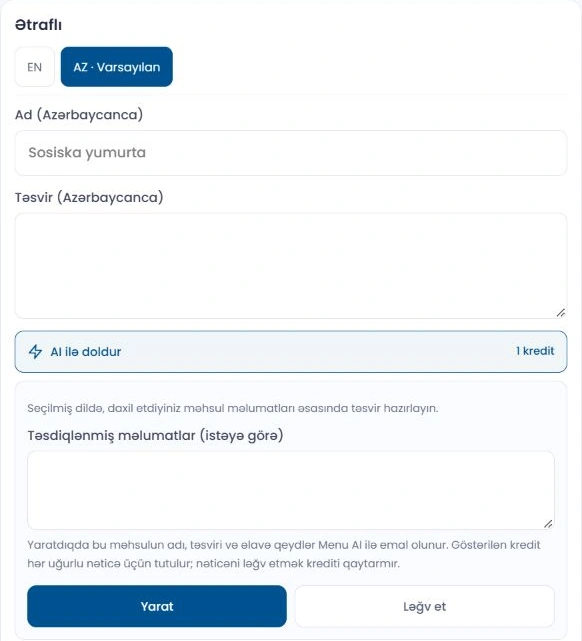
हाँ, स्टूडियो और उत्पाद एडिटर में सक्रिय टूल टेक्स्ट और चित्र के ड्राफ़्ट तैयार कर सकते हैं। परिणाम जाँचें और चुनें, फिर उत्पाद सहेजें। प्रकाशित करने से पहले सामग्री और उत्पाद की दूसरी जानकारी की पुष्टि करें।
क्या उत्पाद के चित्र एक ही शैली में बनाए जा सकते हैं?
अपने व्यवसाय के लिए उपलब्ध चित्र शैली चुनें। एडमिन एक से तीन संदर्भ चित्रों का विश्लेषण करके सुझाए गए नियम जाँच सकता है और शैली सहेज सकता है। इससे पृष्ठभूमि, रोशनी और संयोजन एक जैसे रखने में मदद मिलती है; फिर भी हर परिणाम जाँचना ज़रूरी है।
क्या मेरे ग्राहक को कोई ऐप इंस्टॉल करना होगा?
नहीं। आपका लिंक या QR कोड ग्राहक के फ़ोन ब्राउज़र में कैटलॉग खोलता है। अलग ऐप इंस्टॉल करने की ज़रूरत नहीं है।
क्या एक उत्पाद के कई आकार और कीमतें हो सकती हैं?
हाँ। आकार, मात्रा और दूसरी पसंद के लिए वैरिएंट इस्तेमाल करें तथा अतिरिक्त उत्पाद या सेवाओं के लिए अतिरिक्त विकल्प जोड़ें। आयात करते समय जाँचें कि हर कीमत सही आकार से जुड़ी है और विकल्प समूह एक जैसे हैं।
ऑर्डर, वीडियो और AR कैसे काम करते हैं?
सक्रिय ऑर्डर प्रकार पैनल में सँभाले जाते हैं। आप उत्पाद के वीडियो और सामग्री के तैयार ऐनिमेशन अपलोड कर सकते हैं। AR के लिए अनुकूल 3D मॉडल फ़ाइल और समर्थित डिवाइस चाहिए। AI से वीडियो बनाना अभी सक्रिय नहीं है; वीडियो और 3D फ़ाइलें अलग से तैयार करके अपलोड करें।
क्या मैं कैटलॉग को कई भाषाओं में उपलब्ध करा सकता हूँ?
हाँ। व्यवसाय की सेटिंग में कैटलॉग की भाषाएँ और डिफ़ॉल्ट भाषा चुनें, फिर श्रेणी और उत्पाद के अनुवाद भरें। भाषा जोड़ने से हर फ़ील्ड का अपने आप अनुवाद नहीं होता; हर भाषा जाँचें।

क्या मैं खुलने का समय और Google Maps जोड़ सकता हूँ?
हाँ। समय, पता, फ़ोन और सोशल प्रोफ़ाइल जोड़ें। Google Maps में सामान्य साझा लिंक, छोटे maps.app.goo.gl लिंक और अनुकूल एम्बेड जानकारी समर्थित है। सहेजने के बाद कैटलॉग में नक्शा जाँचें।
क्या एडमिन आयात का इतिहास देख सकता है और आयात बहाल कर सकता है?
नए सहेजे गए आयात एडमिन के बदलाव इतिहास में दिखते हैं। बाद के संपादनों और जुड़े ऑर्डर की जाँच के बाद सबसे नया योग्य आयात बहाल किया जा सकता है। जब इन जाँचों से मौजूदा डेटा की सुरक्षा सुनिश्चित नहीं होती, तो बहाली रोक दी जाती है।
क्या कैटलॉग बदलने पर मुझे QR कोड दोबारा प्रिंट करना होगा?
कैटलॉग का लिंक वही रहने पर उत्पाद और कीमतों के बदलाव के लिए नया QR कोड ज़रूरी नहीं है। लिंक बदलने पर मौजूदा कोड जाँचें। QR स्टैंड पेज पर भौतिक प्रदर्शन के विकल्प देखें।
मैं कैसे शुरू करूँ और योजना चुनूँ?
शुरू करें बटन लॉगिन खोलता है, जहाँ खाता न होने पर पंजीकरण किया जा सकता है। अपना व्यवसाय जोड़ें और कैटलॉग तैयार करें। मूल्य पेज पर सीमाओं और शामिल सुविधाओं की तुलना करें; AI क्रेडिट अलग से दिखाए जाते हैं।